Real estate – rent rolls and statements from PDFs as a table
Rent rolls, owner statements and contractor invoices from PDFs into one Excel table – no retyping. With a real example and result.
By Christian Gerloff · Published August 28, 2026
In short: Tiro reads rent rolls, owner statements and other real estate documents from PDFs and scans and returns them as a table – header fields such as property and as-of date once per document, every unit as its own row. No template, no training, with real numbers and ISO dates – the example is a rent roll with 12 units, 11 header fields and 10 columns per unit.
Below is the complete example: the document, the extracted data and the result in the app.
Who this is built for
Whoever manages a single property produces rent rolls – whoever owns many properties across several managers receives them. Portfolio owners, asset managers, family offices and lenders get a stack of PDFs every month or quarter, in as many layouts as there are managers, and consolidate them by hand into one spreadsheet: occupancy, scheduled rent, expiring leases, arrears. That retyping is what disappears.
What else real estate teams use it for
Rent rolls from every manager into one portfolio table (the example below).
Owner statements: income, expenses, reserves and distribution per property and month – as rows for your own books.
Contractor and vendor invoices sent to the management company (and the bank statements of the property accounts): property, cost centre, line items, amounts – recoverable or not.
Leases and amendments: parties, term, base rent, service charges, deposit, indexation clauses – the master data for the lease register.
Enquiries from listing portals (name, contact, property, preferred date) – as soon as the e-mail inbox is available.
Why not just a PDF-to-Excel converter?
A PDF-to-Excel converter copies the page layout into cells. For a rent roll that means amounts as text with thousands separators, dates in whatever format the manager uses, different columns for every document. Parseur and Airparser solve this with fields instead of layout – Parseur's first customers were, in fact, real estate agents with lead e-mails. Tiro takes the same route with one difference that matters in real estate reporting: dates and numbers are normalised by default (Parseur delivers the date as text in the source format). What comes out of Tiro, Excel can sum, filter and sort by lease end right away.
Example: from document to table
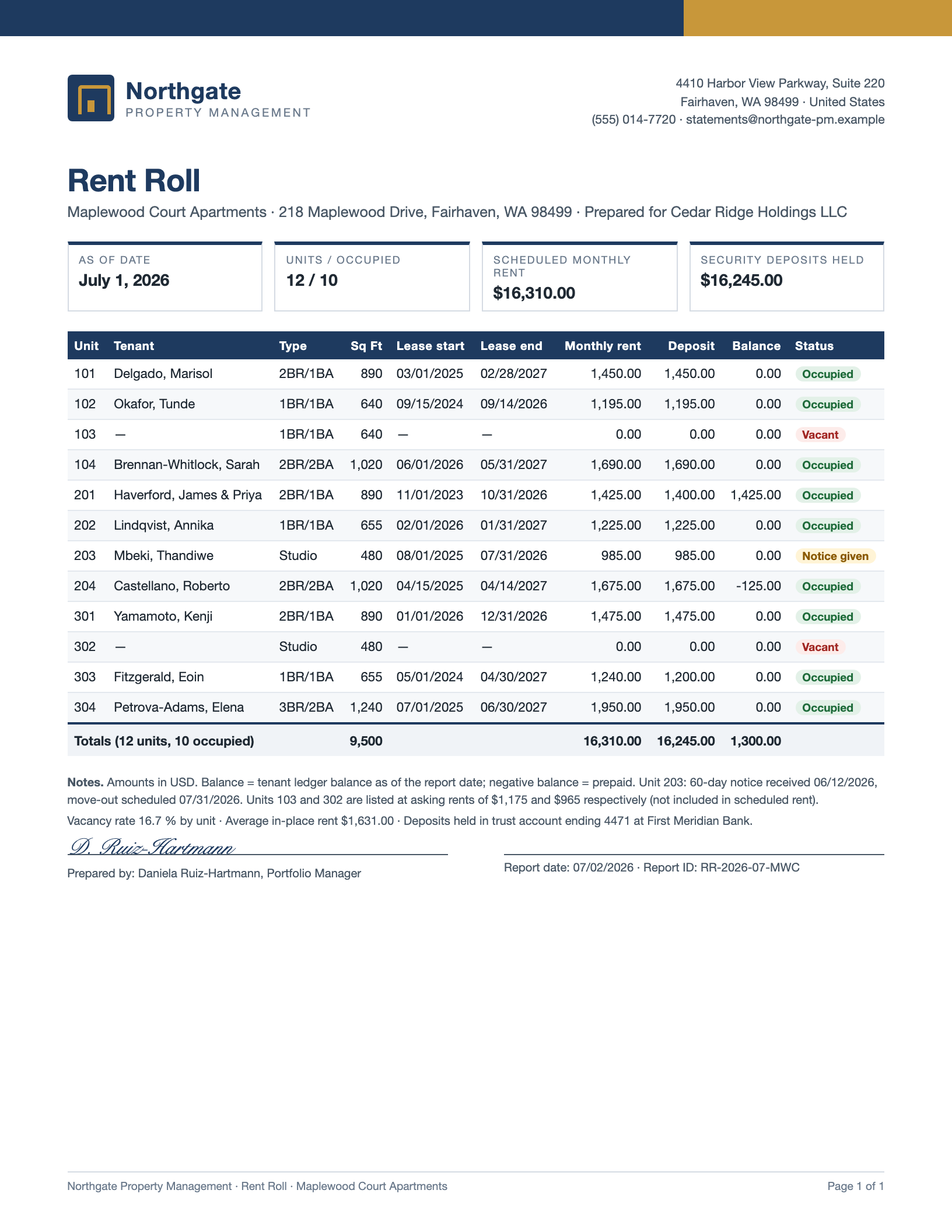
A fictional document, one inbox, one run in Tiro — shown unchanged. Company, people and figures are invented.
Header fields once per document, the table as one row per line item — dates as dates, numbers as numbers. The first rows are expanded, the rest follows behind.
Header fields
Field
Value
Property
Maplewood Court Apartments
Property address
218 Maplewood Drive, Fairhaven, WA 98499
Owner
Cedar Ridge Holdings LLC
Property manager
Northgate Property Management
As of date
Jul 1, 2026
Report ID
RR-2026-07-MWC
Total units
12
Occupied units
10
Scheduled monthly rent
16,310
Deposits held
16,245
Currency
USD
Line items (12)
Unit
Tenant
Type
Sq ft
Lease start
Lease end
Monthly rent
Deposit
Balance
Status
101
Delgado, Marisol
2BR/1BA
890
Mar 1, 2025
Feb 28, 2027
1,450
1,450
0
Occupied
102
Okafor, Tunde
1BR/1BA
640
Sep 15, 2024
Sep 14, 2026
1,195
1,195
0
Occupied
103
—
1BR/1BA
640
—
—
0
0
0
Vacant
104
Brennan-Whitlock, Sarah
2BR/2BA
1,020
Jun 1, 2026
May 31, 2027
1,690
1,690
0
Occupied
201
Haverford, James & Priya
2BR/1BA
890
Nov 1, 2023
Oct 31, 2026
1,425
1,400
1,425
Occupied
202
Lindqvist, Annika
1BR/1BA
655
Feb 1, 2026
Jan 31, 2027
1,225
1,225
0
Occupied
203
Mbeki, Thandiwe
Studio
480
Aug 1, 2025
Jul 31, 2026
985
985
0
Notice given
204
Castellano, Roberto
2BR/2BA
1,020
Apr 15, 2025
Apr 14, 2027
1,675
1,675
-125
Occupied
301
Yamamoto, Kenji
2BR/1BA
890
Jan 1, 2026
Dec 31, 2026
1,475
1,475
0
Occupied
302
—
Studio
480
—
—
0
0
0
Vacant
303
Fitzgerald, Eoin
1BR/1BA
655
May 1, 2024
Apr 30, 2027
1,240
1,200
0
Occupied
304
Petrova-Adams, Elena
3BR/2BA
1,240
Jul 1, 2025
Jun 30, 2027
1,950
1,950
0
Occupied
Show all 12 rowsShow fewer rows
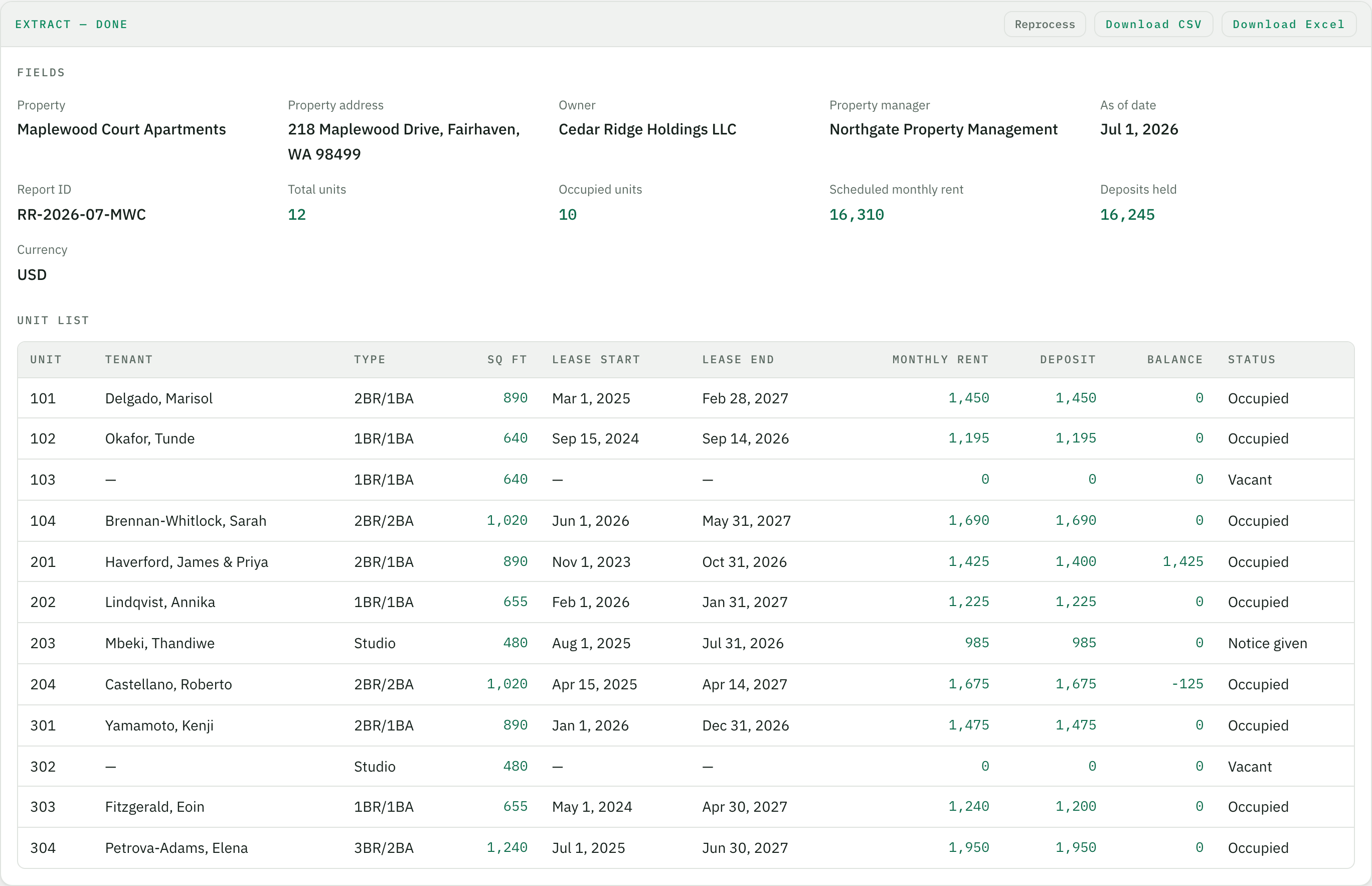
3. What it looks like in Tiro
The result in the browser, right after the upload. From here it is one click to Excel or CSV.
How it works
Create a "Rent rolls" inbox
After signing up you give the inbox a name. On the first upload the AI proposes the fields – property, as-of date, scheduled rent, unit list. You adjust names and order once.
Upload rent rolls
From any manager, in any layout – every PDF is read on its own. Scans work exactly like digitally created files.
Download the table
One row per unit, across all properties. Dates as dates, rent as numbers. Excel or CSV, ready for a pivot, a covenant check or the portfolio report.
What is a rent roll and who receives many of them?
A rent roll is the tenant list of a property as of a date – unit, tenant, lease start and end, monthly rent, deposit, status. Property managers produce it; owners with several managers, asset managers and lenders receive one per property every month or quarter, each in a different layout, and retype it into their portfolio spreadsheet.
Does it work with rent rolls from different managers and software systems?
Yes. Tiro has no templates that must match the layout. Every document is read individually and the values land in the fields you defined once. A rent roll from Yardi looks different from one out of AppFolio or Excel – the table afterwards is the same.
Are vacancies and missing values handled correctly?
Vacant units stay in as rows, with tenant and lease dates left empty rather than invented. In the example above units 103 and 302 are vacant – the AI returned them with status "Vacant" and without a lease start.
What about owner statements, invoices or leases?
Each document type gets its own inbox with its own fields – owner statements with income, expenses and distribution, contractor invoices with line items, leases with parties, term and rent. The principle is always the same: define fields, upload, table.
Where are the documents processed and how long are they kept?
The app runs on servers in Germany, AI processing goes through AWS Bedrock in the EU region Frankfurt, with no training on your data. Retention is set per inbox – down to "delete right after export".
What does it cost?
Getting started is free – 20 pages per month, no credit card. One page is one credit, so a one-page rent roll costs one credit. Paid plans differ only in the number of pages.