Bank statements from PDF to Excel – transaction rows, balance fields
Bank statements from different banks into one table: transactions as rows with date, amount and balance, balances as fields – example with three bank layouts.
By Christian Gerloff · Published August 29, 2026
In short: Tiro reads bank statements as PDF – from online banking or scanned – and returns the transactions as a table: one row per transaction with booking date, value date, description, reference, amount and balance; bank, account number, period and balances as header fields. The bank's layout does not matter – in the example 34 transactions from three bank layouts (US, UK, euro/SEPA) run into one table.
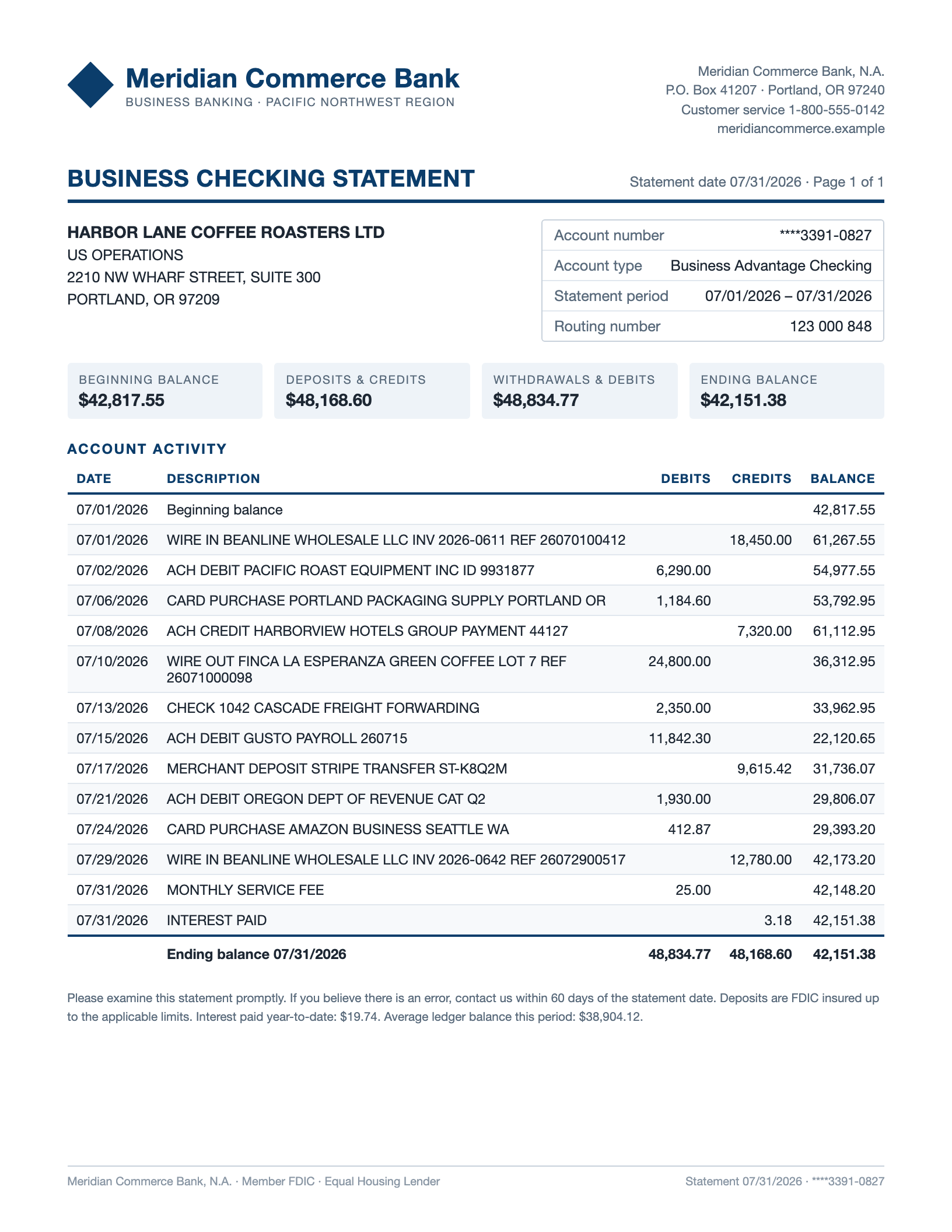
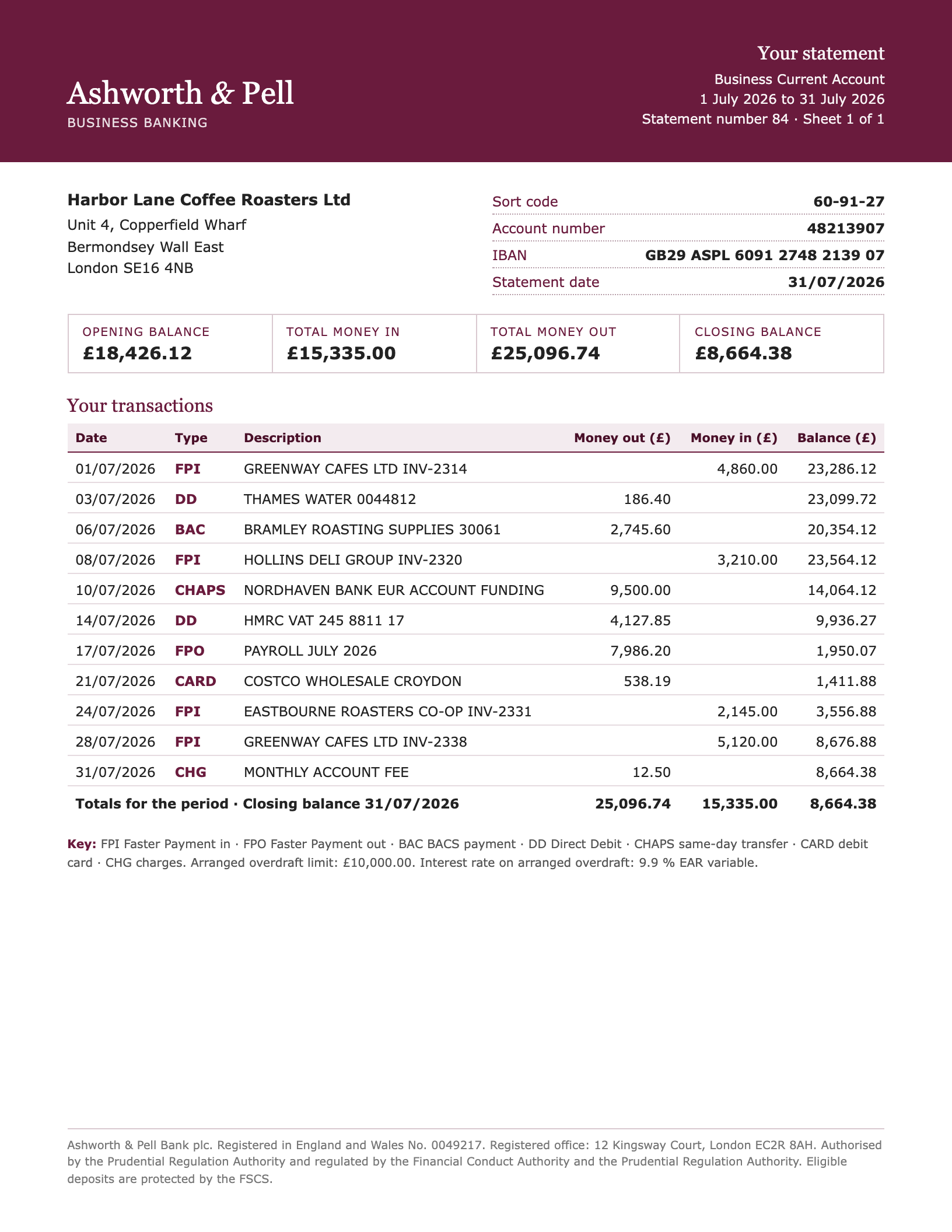
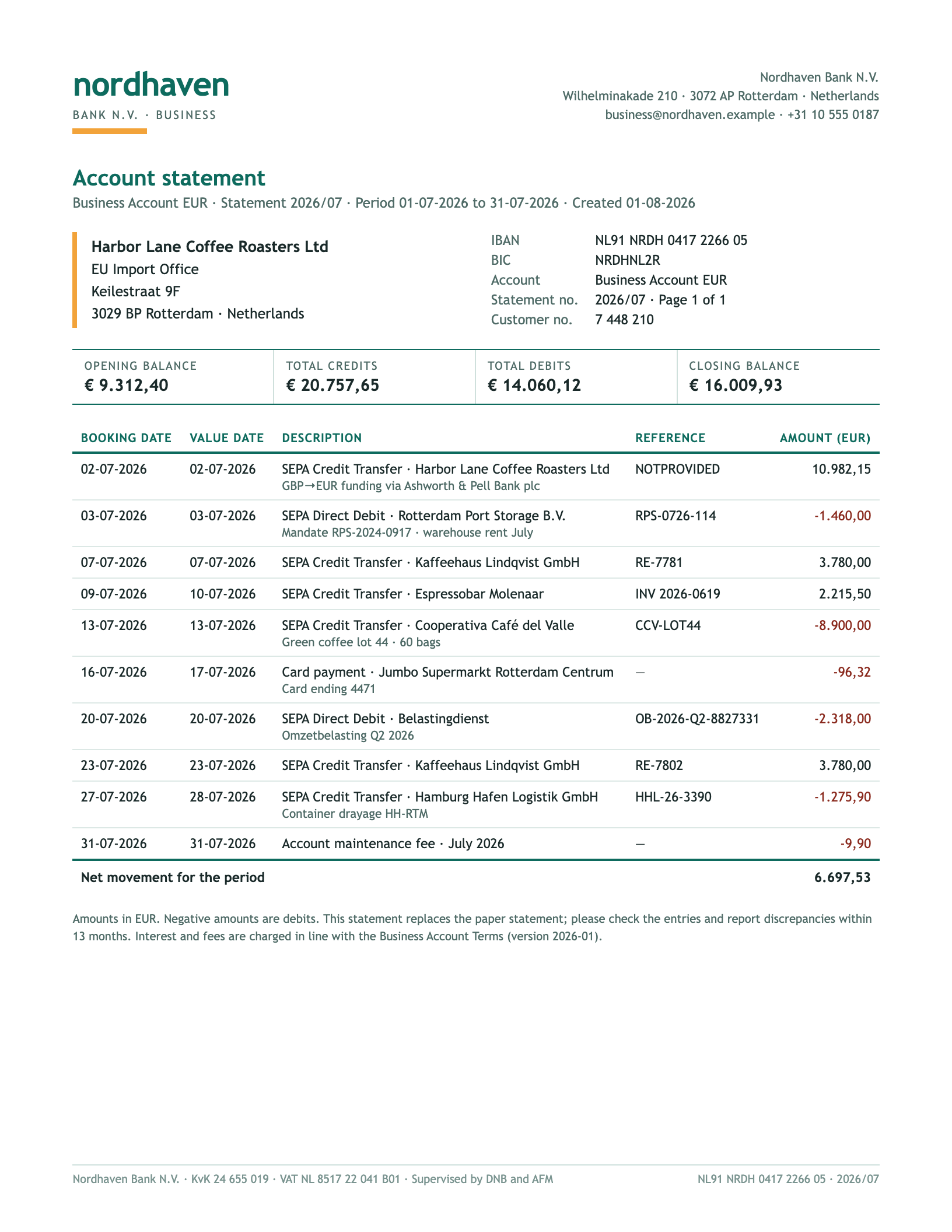
Below you see the three statements of the same company and the values that come out of each.
How Tiro reads a bank statement
Every bank prints differently: separate columns for debits and credits or one signed amount column, dates as 07/31/2026 or 31-07-2026, amounts as 1,250.00 or 1.250,00, with or without a running balance. Layout converters break every statement differently; banking exports usually exist only for your own account, not for the statements of customers, tenants or clients.
Tiro works through the fields, not the layout: you define once which values you want and in what form – “signed amount”, “date as ISO”, “IBAN if printed”. The AI reads every page as text and as image, finds the values in the given layout and returns them in exactly that form: real numbers, real dates, the same columns for every bank.
What people typically pull out of bank statements
Transactions for bookkeeping – statements of accounts without a banking interface into the ledger or the reconciliation.
Checking third-party statements – lenders, landlords and law firms receive bank statements as PDF and need the transactions as a table.
Reconciling period and balances – opening and closing balance, totals of credits and debits per statement as fields for plausibility checks.
Credit card and payment provider statements – same pattern, different layout: one inbox with matching fields.
Why not the banking export or a PDF converter?
The CSV export from online banking is the best route – if you have it. For third-party statements, old periods or banks without an export, the PDF remains. PDF-to-Excel converters copy the layout into cells: different columns for every bank, dates as text, amounts with thousands separators as text. Parseur and Airparser solve this with fields, but return dates as text in the source format. With Tiro, dates, amounts and signs arrive normalised – in the same columns for every bank.
Example: from document to table
A fictional document, one inbox, one run in Tiro — shown unchanged. Company, people and figures are invented.
Header fields once per document, the table as one row per line item — dates as dates, numbers as numbers. The first rows are expanded, the rest follows behind.
Header fields
Field
US business checking
UK business current account
Euro account (SEPA)
Bank
Meridian Commerce Bank
Ashworth & Pell Bank plc
Nordhaven Bank N.V.
Account holder
HARBOR LANE COFFEE ROASTERS LTD
Harbor Lane Coffee Roasters Ltd
Harbor Lane Coffee Roasters Ltd
Account number / IBAN
****3391-0827
GB29 ASPL 6091 2748 2139 07
NL91 NRDH 0417 2266 05
Currency
USD
GBP
EUR
Statement date
Jul 31, 2026
Jul 31, 2026
Aug 1, 2026
Period from
Jul 1, 2026
Jul 1, 2026
Jul 1, 2026
Period to
Jul 31, 2026
Jul 31, 2026
Jul 31, 2026
Opening balance
42,817.55
18,426.12
9,312.4
Closing balance
42,151.38
8,664.38
16,009.93
Total credits
48,168.6
15,335
20,757.65
Total debits
48,834.77
25,096.74
14,060.12
Line items (34)
Source
Booking date
Value date
Description
Reference
Amount
Balance after
US business checking
Jul 1, 2026
Jul 1, 2026
WIRE IN BEANLINE WHOLESALE LLC INV 2026-0611 REF 26070100412
26070100412
18,450
61,267.55
US business checking
Jul 2, 2026
Jul 2, 2026
ACH DEBIT PACIFIC ROAST EQUIPMENT INC ID 9931877
9931877
-6,290
54,977.55
US business checking
Jul 6, 2026
Jul 6, 2026
CARD PURCHASE PORTLAND PACKAGING SUPPLY PORTLAND OR
—
-1,184.6
53,792.95
US business checking
Jul 8, 2026
Jul 8, 2026
ACH CREDIT HARBORVIEW HOTELS GROUP PAYMENT 44127
44127
7,320
61,112.95
US business checking
Jul 10, 2026
Jul 10, 2026
WIRE OUT FINCA LA ESPERANZA GREEN COFFEE LOT 7 REF 26071000098
26071000098
-24,800
36,312.95
US business checking
Jul 13, 2026
Jul 13, 2026
CHECK 1042 CASCADE FREIGHT FORWARDING
1042
-2,350
33,962.95
US business checking
Jul 15, 2026
Jul 15, 2026
ACH DEBIT GUSTO PAYROLL 260715
260715
-11,842.3
22,120.65
US business checking
Jul 17, 2026
Jul 17, 2026
MERCHANT DEPOSIT STRIPE TRANSFER ST-K8Q2M
ST-K8Q2M
9,615.42
31,736.07
US business checking
Jul 21, 2026
Jul 21, 2026
ACH DEBIT OREGON DEPT OF REVENUE CAT Q2
—
-1,930
29,806.07
US business checking
Jul 24, 2026
Jul 24, 2026
CARD PURCHASE AMAZON BUSINESS SEATTLE WA
—
-412.87
29,393.2
US business checking
Jul 29, 2026
Jul 29, 2026
WIRE IN BEANLINE WHOLESALE LLC INV 2026-0642 REF 26072900517
26072900517
12,780
42,173.2
US business checking
Jul 31, 2026
Jul 31, 2026
MONTHLY SERVICE FEE
—
-25
42,148.2
US business checking
Jul 31, 2026
Jul 31, 2026
INTEREST PAID
—
3.18
42,151.38
UK business current account
Jul 1, 2026
Jul 1, 2026
FPI GREENWAY CAFES LTD INV-2314
INV-2314
4,860
23,286.12
UK business current account
Jul 3, 2026
Jul 3, 2026
DD THAMES WATER 0044812
0044812
-186.4
23,099.72
UK business current account
Jul 6, 2026
Jul 6, 2026
BAC BRAMLEY ROASTING SUPPLIES 30061
30061
-2,745.6
20,354.12
UK business current account
Jul 8, 2026
Jul 8, 2026
FPI HOLLINS DELI GROUP INV-2320
INV-2320
3,210
23,564.12
UK business current account
Jul 10, 2026
Jul 10, 2026
CHAPS NORDHAVEN BANK EUR ACCOUNT FUNDING
—
-9,500
14,064.12
UK business current account
Jul 14, 2026
Jul 14, 2026
DD HMRC VAT 245 8811 17
245 8811 17
-4,127.85
9,936.27
UK business current account
Jul 17, 2026
Jul 17, 2026
FPO PAYROLL JULY 2026
—
-7,986.2
1,950.07
UK business current account
Jul 21, 2026
Jul 21, 2026
CARD COSTCO WHOLESALE CROYDON
—
-538.19
1,411.88
UK business current account
Jul 24, 2026
Jul 24, 2026
FPI EASTBOURNE ROASTERS CO-OP INV-2331
INV-2331
2,145
3,556.88
UK business current account
Jul 28, 2026
Jul 28, 2026
FPI GREENWAY CAFES LTD INV-2338
INV-2338
5,120
8,676.88
UK business current account
Jul 31, 2026
Jul 31, 2026
CHG MONTHLY ACCOUNT FEE
—
-12.5
8,664.38
Euro account (SEPA)
Jul 2, 2026
Jul 2, 2026
SEPA Credit Transfer · Harbor Lane Coffee Roasters Ltd GBP→EUR funding via Ashworth & Pell Bank plc
NOTPROVIDED
10,982.15
—
Euro account (SEPA)
Jul 3, 2026
Jul 3, 2026
SEPA Direct Debit · Rotterdam Port Storage B.V. Mandate RPS-2024-0917 · warehouse rent July
RPS-0726-114
-1,460
—
Euro account (SEPA)
Jul 7, 2026
Jul 7, 2026
SEPA Credit Transfer · Kaffeehaus Lindqvist GmbH
RE-7781
3,780
—
Euro account (SEPA)
Jul 9, 2026
Jul 10, 2026
SEPA Credit Transfer · Espressobar Molenaar
INV 2026-0619
2,215.5
—
Euro account (SEPA)
Jul 13, 2026
Jul 13, 2026
SEPA Credit Transfer · Cooperativa Café del Valle Green coffee lot 44 · 60 bags
CCV-LOT44
-8,900
—
Euro account (SEPA)
Jul 16, 2026
Jul 17, 2026
Card payment · Jumbo Supermarkt Rotterdam Centrum Card ending 4471
—
-96.32
—
Euro account (SEPA)
Jul 20, 2026
Jul 20, 2026
SEPA Direct Debit · Belastingdienst Omzetbelasting Q2 2026
The result in the browser, right after the upload. From here it is one click to Excel or CSV.
How it works
Create an inbox
A name is enough, for example “Bank statements”. On the first upload the AI proposes the fields – bank, period, balances and the transaction table. You decide once what should apply, such as “signed amount: credits positive, debits negative”.
Upload the statements
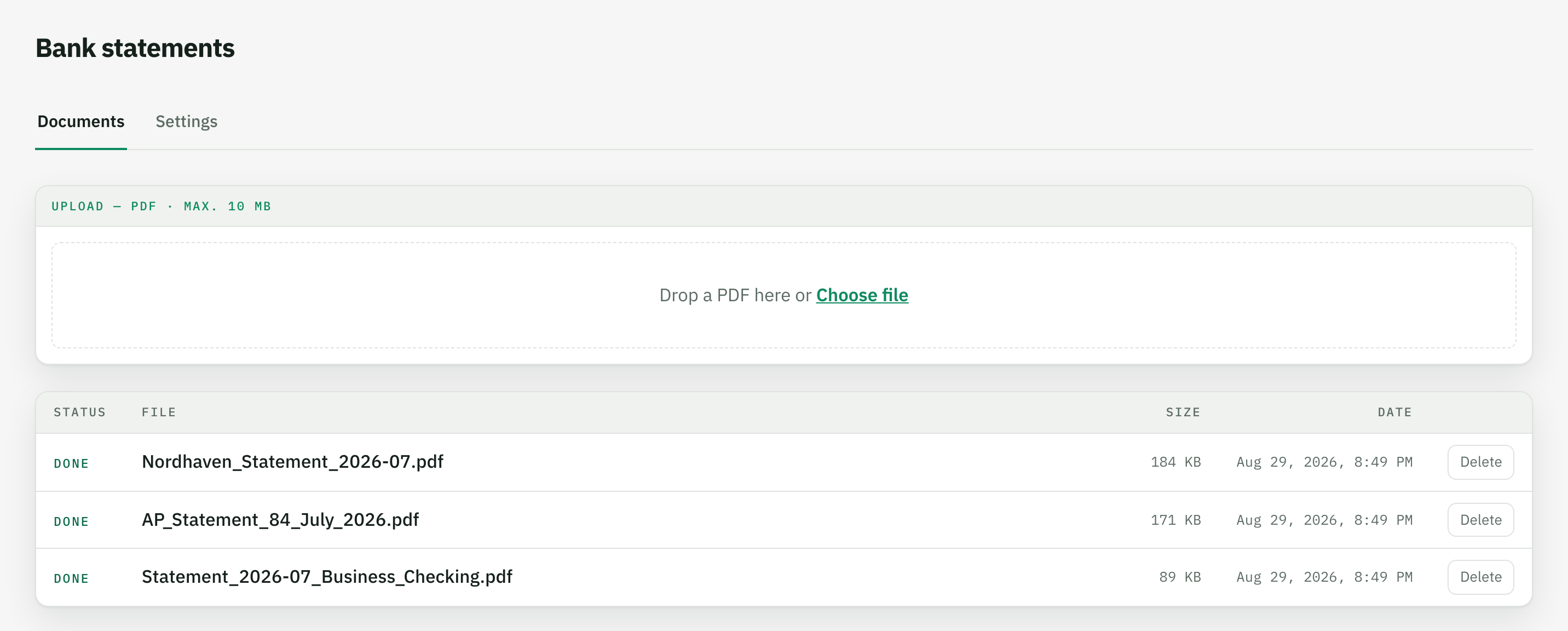
PDF statements from online banking or scanned paper statements – one by one or as a batch, from as many banks as you like. You never say which bank a statement comes from.
Download the table
Every statement yields the same column structure – one row per transaction, header fields such as bank and period repeated in every row. Excel or CSV, dates as dates, amounts as signed numbers; the tables of all statements stack directly underneath each other.
Upload the statement PDF to an inbox, done – Tiro returns the transactions as a table with date, description, amount and balance that you download as Excel or CSV. Unlike a converter, Tiro does not copy the layout but reads the fields; the table looks the same for every bank.
Do I need a separate inbox for every bank?
No. One inbox with one field definition covers all banks – in the example a US, a UK and a euro statement run into the same table. The AI reads the fields from each layout, not from fixed positions. A second inbox only makes sense if you want different columns for an account.
How does Tiro handle debit and credit columns?
You set the target format in the field instruction. In the example it reads “credits positive, debits negative” – the US statement with separate columns, the UK statement with “Money in/out” and the euro statement with one signed column all arrive as a single amount field. You could just as well define two columns, “Debit” and “Credit”.
Are date formats like 07/31/2026 and 31/07/2026 recognised correctly?
Yes. Date fields always arrive as ISO dates (2026-07-31), whether the bank prints MM/DD/YYYY, DD/MM/YYYY or DD-MM-YYYY. The AI recognises the format from the context of the document; in the example all 34 booking dates are correct.
What happens if a bank does not print a running balance per transaction?
Then the field stays empty – as with the euro statement in the example. Tiro does not invent values that are not in the document; the field instruction says so (“empty if the statement does not print a running balance”). Opening and closing balance from the header are there regardless.
Does it work with multi-page statements and scans?
Yes. A PDF may be up to 10 MB, every page costs one page credit. Scanned paper statements are read from the page image, without any OCR setting – details on the PDFs & scans page.
Where are the statements processed?
On servers in Germany; AI processing runs through AWS Bedrock in the EU region Frankfurt, with no training on your data. Retention is set per inbox – down to “delete right after export”.