Logistics – Delivery notes from PDFs and scans as a table
Delivery notes and packing lists from every supplier in one table – carrier, packages, every line item with ordered, delivered and back order. With example.
By Christian Gerloff · Published August 30, 2026
In short: Tiro reads delivery notes and packing lists from PDFs, scans and photos and returns them as a table – header fields such as delivery note number, PO number, carrier, consignment number, packages and weights once per document, every line item as its own row with article number, ordered, delivered, back order and batch. No template, no training – the example is a delivery note with 14 header fields and 11 line items, 2 of them back-ordered.
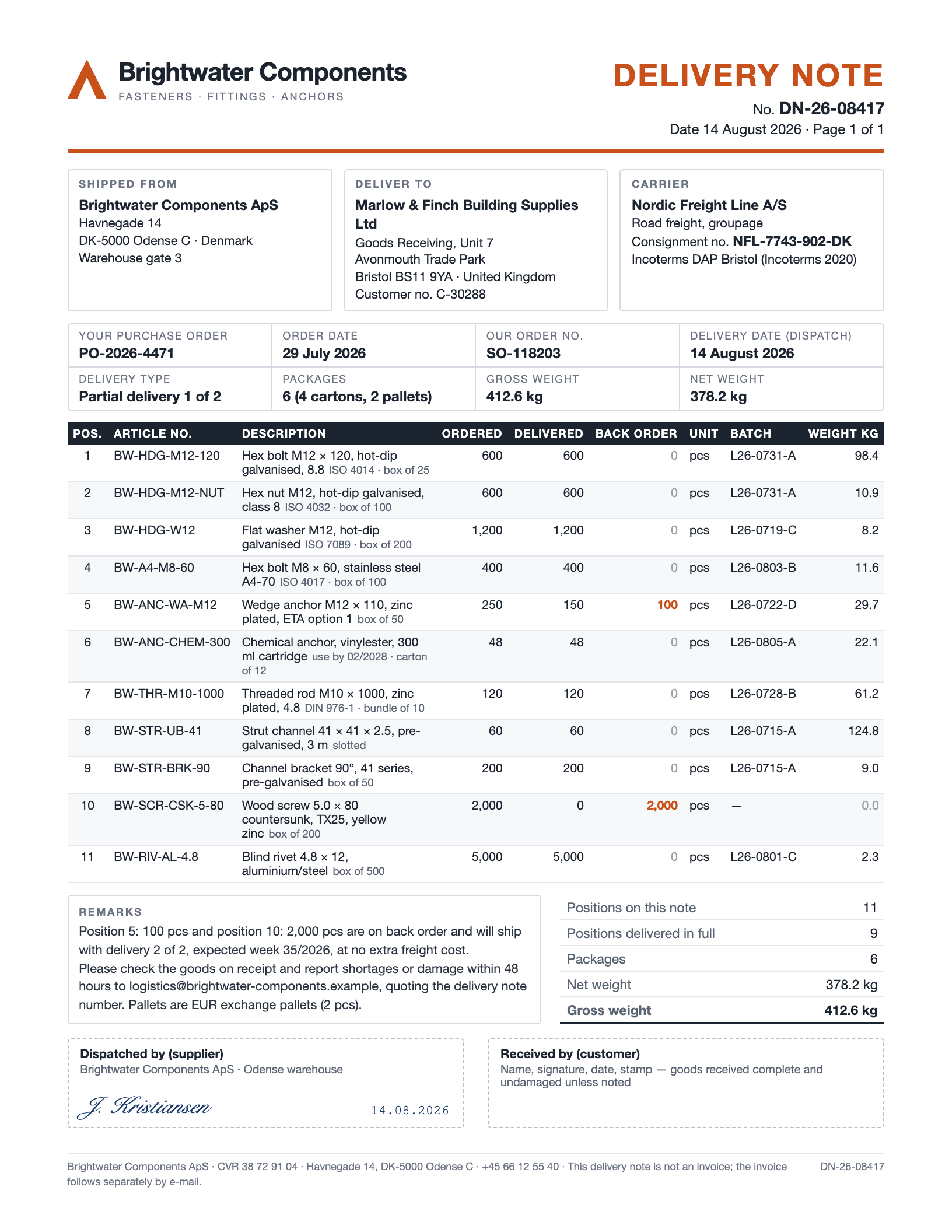
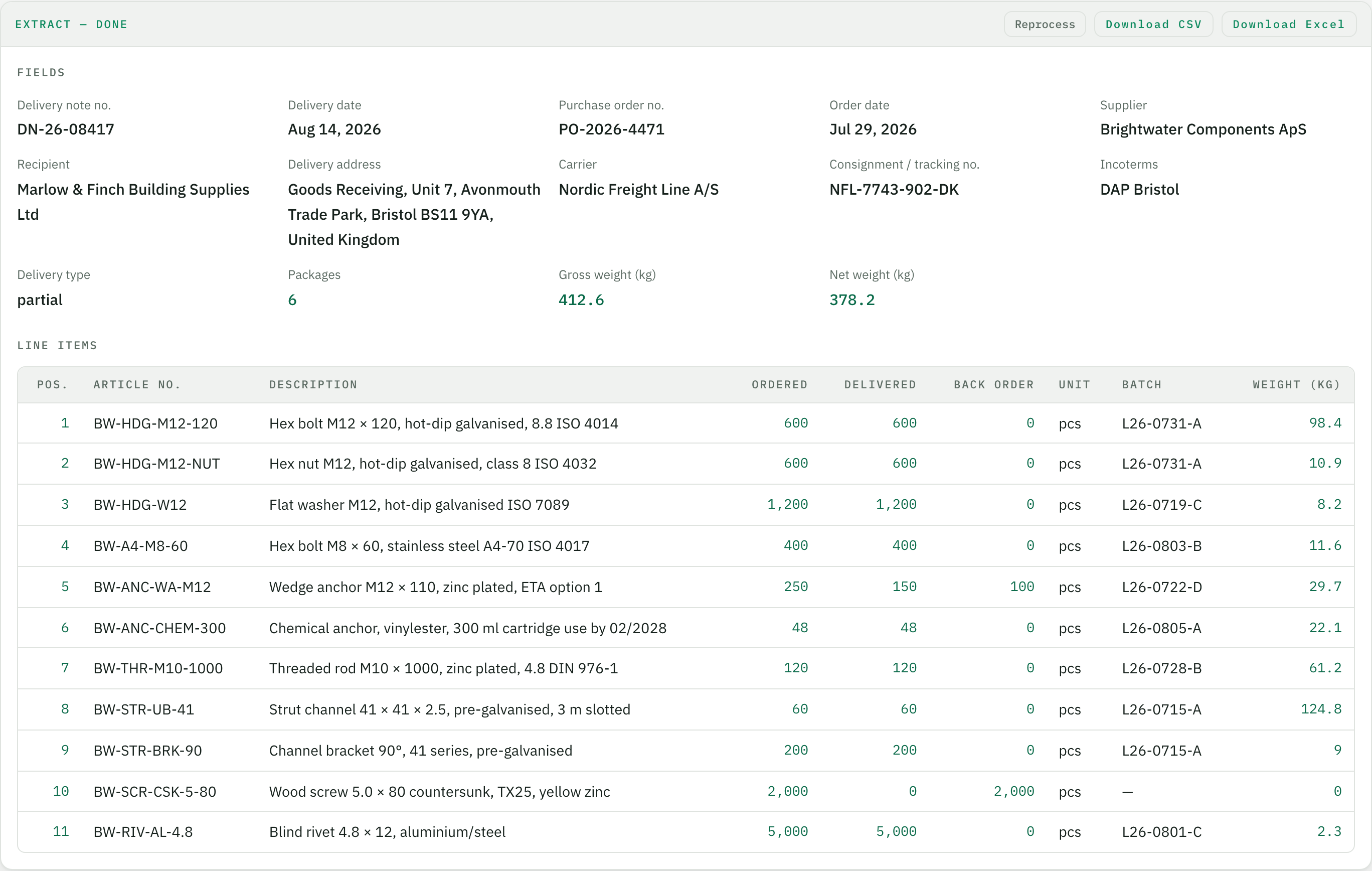
Below is the complete example: the delivery note, the extracted data and the result in the app.
Who this is built for
Whoever ships the goods prints the delivery note – whoever receives many shipments has to record it. Goods receiving at builders' and trade merchants, at manufacturers with hundreds of suppliers, the warehouse of an online retailer, dispatch at a freight forwarder: dozens of delivery notes a day, every supplier with its own layout, as PDF in the dispatch notification, as paper on the pallet, as a photo from the shop floor. The line items then have to be checked against the order, posted in the ERP and the back orders followed up – row by row. That retyping is what disappears.
What else logistics teams use it for
Delivery notes and packing lists (the example below; scanned or photographed documents work as shown on the PDFs & scans page): one row per line item with ordered, delivered, back order and batch – for the goods receipt posting and the back-order list.
Freight invoices from parcel carriers and forwarders: consignment number, weight, zone, toll and fuel surcharges – as rows for freight cost control per shipment.
Consignment notes and bills of lading: shipper, consignee, carrier, packages, weights, pickup and delivery date – for shipment tracking and proof of delivery.
Customs documents and commercial invoices for import: commodity code, country of origin, value, quantity – as a table for the customs declaration or the preference check.
Loading lists, advance shipping notices and damage reports: what was announced, what arrived, what was damaged – one row per shipment for the claim to the supplier.
Why not just a PDF-to-Excel converter?
A PDF-to-Excel converter copies the page layout into cells. For a delivery note that means shipper, consignee and carrier blocks side by side in one row, the two-line article description split across two cells, "1,200" as text, and a different column order for every supplier. Parseur and Airparser solve this with fields instead of layout, but their examples are invoices and e-mails – neither of them shows goods receiving with a partial delivery and a back order. Tiro takes the field approach into logistics with one difference that matters at the match: quantities, weights and dates are normalised by default – ordered, delivered and back order as real numbers, the delivery date as a date, the position with quantity 0 kept as a row. What comes out of Tiro, Excel can check against the purchase order right away; the bank statements page shows the same idea applied to payments.
Example: from document to table
A fictional document, one inbox, one run in Tiro — shown unchanged. Company, people and figures are invented.
Header fields once per document, the table as one row per line item — dates as dates, numbers as numbers. The first rows are expanded, the rest follows behind.
Header fields
Field
Value
Delivery note no.
DN-26-08417
Delivery date
Aug 14, 2026
Purchase order no.
PO-2026-4471
Order date
Jul 29, 2026
Supplier
Brightwater Components ApS
Recipient
Marlow & Finch Building Supplies Ltd
Delivery address
Goods Receiving, Unit 7, Avonmouth Trade Park, Bristol BS11 9YA, United Kingdom
Carrier
Nordic Freight Line A/S
Consignment / tracking no.
NFL-7743-902-DK
Incoterms
DAP Bristol
Delivery type
partial
Packages
6
Gross weight (kg)
412.6
Net weight (kg)
378.2
Line items (11)
Pos.
Article no.
Description
Ordered
Delivered
Back order
Unit
Batch
Weight (kg)
1
BW-HDG-M12-120
Hex bolt M12 × 120, hot-dip galvanised, 8.8 ISO 4014
600
600
0
pcs
L26-0731-A
98.4
2
BW-HDG-M12-NUT
Hex nut M12, hot-dip galvanised, class 8 ISO 4032
600
600
0
pcs
L26-0731-A
10.9
3
BW-HDG-W12
Flat washer M12, hot-dip galvanised ISO 7089
1,200
1,200
0
pcs
L26-0719-C
8.2
4
BW-A4-M8-60
Hex bolt M8 × 60, stainless steel A4-70 ISO 4017
400
400
0
pcs
L26-0803-B
11.6
5
BW-ANC-WA-M12
Wedge anchor M12 × 110, zinc plated, ETA option 1
250
150
100
pcs
L26-0722-D
29.7
6
BW-ANC-CHEM-300
Chemical anchor, vinylester, 300 ml cartridge use by 02/2028
48
48
0
pcs
L26-0805-A
22.1
7
BW-THR-M10-1000
Threaded rod M10 × 1000, zinc plated, 4.8 DIN 976-1
The result in the browser, right after the upload. From here it is one click to Excel or CSV.
How it works
Create the "Delivery notes" inbox
After signing up you give the inbox a name. On the first upload the AI proposes the fields – delivery note number, PO number, supplier, carrier, packages, a table of line items. You decide what you need (batch, back order, weight) and adjust the names once.
Upload delivery notes
From any supplier, in any layout – as PDF from the dispatch e-mail, as a scan from goods receiving or as a phone photo of the paper on the pallet. Every document is read on its own, stamps and handwritten ticks included.
Download the table
One row per line item across all delivery notes, quantities as real numbers, dates as dates. Excel or CSV – ready for the three-way match, the goods receipt posting in your ERP or the back-order list.
What is on a delivery note and who receives many of them?
A delivery note (packing list, packing slip) travels with the goods and documents what was actually shipped – delivery note and purchase order number, shipper, consignee, carrier with consignment number, packages and weights, and per line item the article number, description, ordered and delivered quantity, back order and batch. Whoever receives many shipments – goods receiving at retailers, manufacturers and construction firms, dispatch at a freight forwarder, the warehouse of an online shop – gets dozens a day, every supplier in a different layout.
Does Tiro recognise partial deliveries and back orders?
Yes – in the example above two of eleven positions are not delivered in full, one of them not at all. Ordered, delivered and back order land in three numeric columns, and the delivery type is extracted as a field ("partial" or "complete"). A position with quantity 0 stays as a row instead of disappearing – exactly the row goods receiving needs for the back-order list.
Does it work with stamped or photographed delivery notes?
Yes. A scanned or photographed delivery note is read from the page image; stamps and handwritten notes do not get in the way as long as the print stays legible – on the [PDFs & scans](/en/solutions/pdf-and-scans) page you see the same purchase order as digital PDF, scan and phone photo with a handwritten quantity correction.
Can Tiro match the delivery note against my purchase order?
Not yet inside Tiro – the PO number and the quantities per position come out as fields, which makes the match against the order a VLOOKUP in Excel or an import into your ERP. A rule check directly in the app is planned as part of the review step.
How do I convert a delivery note to Excel?
Upload the delivery note as PDF, scan or photo to an inbox – Tiro returns the header fields and one row per line item with article number, ordered, delivered, back order, batch and weight, as Excel or CSV. Packing lists and delivery notes from other suppliers run into the same table because the fields count, not the layout.
Which other documents does it handle?
Freight invoices from parcel carriers and forwarders (consignment number, weight, zone, surcharges), consignment notes and bills of lading, loading lists and advance shipping notices, customs documents and commercial invoices for import, damage and discrepancy reports. Each document type gets its own inbox with its own fields – the principle is always the same: define fields, upload, table.
Where are the documents processed and how long are they kept?
The app runs on servers in Germany, AI processing goes through AWS Bedrock in the EU region Frankfurt, with no training on your data. Retention is set per inbox – down to "delete right after export".
What does it cost?
Getting started is free – 20 pages per month, no credit card. One page is one credit, so the one-page delivery note above costs one credit. Paid plans differ only in the number of pages.